Best Gallery & Photo Cleanup Apps for Android
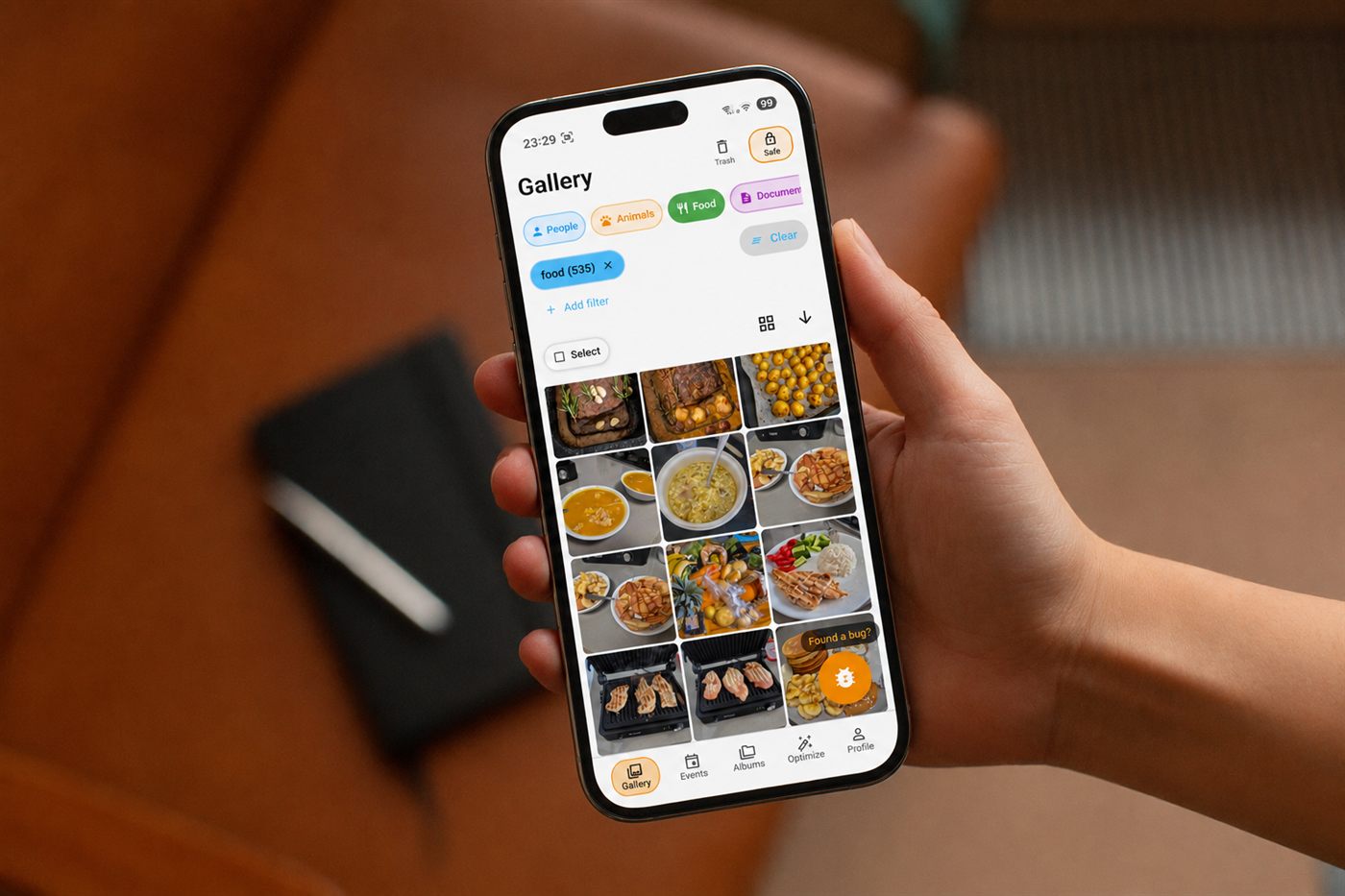
Your Android gallery has to handle more than just displaying photos. Every day, new photos, screenshots, videos, and downloads pile up - until your library turns into thousands of files that are hard to search, organize, or clean up. Different apps take different approaches: some focus on cloud backup, others on local organization, and some are dedicated purely to finding duplicates. Here's how the most useful ones compare.
| App | Best for | Standout feature | Pricing |
|---|---|---|---|
| Filtored | One gallery that organizes, protects, and cleans up your photos | On-device AI: Events, people, duplicates, and cleanup in one app | Free, with Plus/Premium subscriptions |
| Google Photos | Cloud backup, search, and cross-device access | 15GB free storage and powerful AI search | Free (shared 15GB); Google One for more |
| Aves Gallery | Power users who want a free, advanced local gallery | Deep metadata support and format coverage | Free and open-source |
| F-Stop Gallery | Detailed manual control without a subscription | Tags, ratings, smart albums, nested folders | Free; Pro is a one-time purchase |
| Piktures | Combining local storage with cloud drives | Local, cloud, and network media in one gallery | Free basic; Premium/Prime tiers |
| Fossify Gallery | Privacy and simplicity without subscriptions | No ads, no tracking, open-source | Free, no subscription |
| Amazon Photos | Amazon and Prime users wanting cloud backup | Unlimited full-res photo storage for Prime members | Free (5GB); included with Prime |
| Remo | Finding duplicates without switching galleries | Dedicated duplicate and similar-photo scanner | Free |
What matters most to you in a photo gallery app?
… votes
Click an option to see how other readers voted.

Filtored
Filtored is an AI-powered gallery replacement built to manage both the photos you take today and the years of photos you've already accumulated. Instead of manually made albums, it automatically groups photos into Events based on when and how they were captured, and can recognize people, text, barcodes, and visual content to make your library easier to explore. It combines everyday gallery browsing with cleanup tools for duplicates, similar photos, screenshots, and large videos - and because the AI runs entirely on your device, it works offline and never uploads your photos to a server.
Strengths
- AI-powered everyday gallery organization
- Automatic Events instead of manual grouping
- People, text, barcode, and image recognition
- Duplicate and similar-photo detection
- Screenshot and large-video cleanup
- Safe Vault for private photos
- On-device, offline AI processing - no account required
- Dark/light modes and appearance customization
Limitations
- Newer than some established gallery apps
- Some advanced features and higher limits require a subscription
- More focused on automation than traditional folder-based management
Best for: People who want one gallery that can organize, understand, protect, and clean up their photos.

Google Photos
One of the most comprehensive photo apps on Android, combining cloud backup, search, organization, editing, and sharing. It automatically groups similar photos into stacks and offers storage-management tools.
Strengths
- 15GB of free cloud storage
- Excellent backup and cross-device access
- Powerful AI search, recognition, and editing tools
- Strong sharing and ecosystem integration
Limitations
- Free storage is shared across Photos, Gmail, and Drive
- Larger libraries need a paid Google One plan
- Cleanup is a side feature, not the main focus
Best for: People who want cloud backup, search, and cross-device access above all else.

Aves Gallery
A powerful local gallery and media explorer built around navigation, search, metadata, tags, and a wide range of image and video formats, from common JPEG/MP4 to SVG, multi-page TIFF, and 360° media.
Strengths
- Free, open-source, no subscription
- Excellent metadata support and format coverage
- Advanced search, tags, albums, and maps
Limitations
- Feels more technical than mainstream galleries
- Not built around automated cleanup
- No cloud-backup ecosystem
Best for: Power users who want detailed, free control over a large local photo collection.
F-Stop Gallery
Focused on giving users control over how their library is organized: tags, ratings, smart albums, nested folders, metadata, and custom sorting.
Strengths
- Advanced tagging and ratings, smart albums
- Nested folders, EXIF/XMP/IPTC metadata support
- Private photo vault, custom themes
- One-time Pro purchase instead of a subscription
Limitations
- More manual than AI-first gallery apps
- Some features require paying for Pro
- Cleanup and duplicate detection aren't the focus
Best for: People who want detailed manual control without a recurring subscription.
Piktures
An all-in-one gallery that brings together media from your phone, SD cards, USB drives, cloud services, and network storage, including a private vault, editing tools, and search.
Strengths
- Local and cloud media in one gallery
- Google Drive, OneDrive, and network storage support
- Private vault and photo/video editing
Limitations
- More complex than a basic gallery
- Contains ads and in-app purchases
- Less focused on automated AI organization
Best for: People who want one gallery to manage local media alongside cloud and network storage.

Fossify Gallery
Takes the opposite approach to cloud-heavy platforms: an open-source gallery built around local media, privacy, and simplicity, with no ads and no unnecessary permissions.
Strengths
- Free, open-source, no ads, no subscription
- Recycle bin, PIN/pattern/fingerprint protection
- EXIF metadata removal, extensive customization
Limitations
- More traditional gallery experience
- No large AI-powered organization system
- Limited automated cleanup
Best for: People who want a straightforward, private gallery without ads or subscriptions.

Amazon Photos
Primarily a cloud storage and backup service that automatically backs up photos and videos, with search, albums, sharing, and image recognition across phones, tablets, and computers.
Strengths
- 5GB free storage; strong value for Prime members
- Automatic cloud backup at full resolution
- Search, recognition, Memories and Stories
Limitations
- Primarily cloud-storage focused
- Prime benefits vary by country
- Limited dedicated cleanup tools
Best for: Amazon and Prime users who mainly want cloud backup and storage.

Remo Duplicate Photos Remover
Unlike the other apps here, Remo isn't trying to replace your gallery - it's a dedicated cleanup tool that scans your phone or MicroSD card for duplicate and similar images, groups them for review, and lets you delete unwanted copies while keeping an original.
Strengths
- Free, no subscription required
- Finds exact and similar images
- Scans internal and MicroSD storage
Limitations
- Not a gallery replacement
- Only covers duplicates, not screenshots or large videos
- Requires a separate app alongside your normal gallery
Best for: People who like their existing gallery but need a dedicated duplicate-finder.
Gallery apps vs. photo cleanup apps
Looking at pricing models reveals an important difference between these apps. Some are free forever, like Aves and Fossify. Others use a one-time purchase, like F-Stop Pro. Google Photos and Amazon Photos are tied mainly to cloud-storage subscriptions or memberships, while Piktures uses multiple paid tiers for people who need more cloud functionality. Dedicated cleanup apps like Remo can be completely free, but they solve a much narrower problem: finding duplicates.
Filtored sits somewhere different - a full gallery replacement that also brings cleanup, recognition, privacy, and organization into the same experience, so you don't need one app to browse your photos, another to find duplicates, another to hide private photos, and another to organize your library.
Which one is right for you?
Google Photos is a strong choice if cloud backup, search, and cross-device access are your priorities. Amazon Photos makes sense if you're already invested in Amazon and want cloud storage, particularly with Prime. Aves Gallery is a strong option for power users who want an advanced, free local gallery. F-Stop Gallery suits people who want detailed manual control and are comfortable paying once for Pro. Piktures is useful if you want to combine local storage with cloud drives and network storage. Fossify Gallery is a good choice if privacy, simplicity, and no subscription matter more than AI-powered organization. Remo is useful when your main problem is duplicate photos and you don't need a new gallery.
Filtored takes a broader approach: an AI-powered gallery that combines everyday organization, recognition, cleanup, privacy, security, and customization in one app, with all AI processing happening on your device.
Pricing and features reflect each app's public store listing as of September 2026 and can change - always check the app's current Play Store page before buying.